Deploy to Fly.io
This guide walks you through deploying ThunderHub to Fly.io . It deploys applications as lightweight virtual machines (Fly Machines) close to users in edge locations worldwide.
At the end of this guide, you’ll end up with a public HTTPS URL running ThunderHub, ready to connect to your Lightning node.
What you’ll need
- A Fly.io account with a credit card on file
- A Lightning node you can connect to
There are two ways to deploy ThunderHub to Fly.io. Pick whichever you prefer:
- Method A:
flyctlCLI: terminal-based, most control over configuration - Method B: Fly dashboard: point-and-click via the web UI, no local CLI required
The post-deploy steps (first-run setup, custom domain, updating) are the same for both methods.
Through Fly CLI
1. Install flyctl
macOS
brew install flyctlSign in:
fly auth loginThis opens your browser for authentication.
2. Clone the ThunderHub repository
git clone https://github.com/apotdevin/thunderhub.git
cd thunderhub
3. Review the fly.toml file
The ThunderHub repository ships with a fly.toml at the root, so you don’t need to write one yourself.
Want to change the region, VM size, environment variables, or other settings?
Edit fly.toml before running fly launch in the next step. See the Fly.io
configuration reference for all
available options.
4. Launch the app
From the thunderhub directory, run:
fly launch --copy-config --no-deployAnswer the prompts:
| Prompt | Answer |
|---|---|
| App name | Anything unique (e.g. my-thunderhub) |
| Region | The region closest to you |
| Set up Postgres? | No |
| Set up Upstash Redis? | No |
| Tigris object storage? | No |
| Sentry monitoring? | No |
| Deploy now? | No (we set a secret first) |
--copy-config tells Fly to use the fly.toml you wrote above. --no-deploy
skips deployment so we can configure the encryption key before the first boot.
After this finishes, Fly has registered your app and updated fly.toml with the app name and region you picked.
5. Set the database encryption key
ThunderHub encrypts every node credential it stores using AES-256-GCM. Generate a 32-byte key and set it as a Fly secret:
macOS / Linux
fly secrets set DB_ENCRYPTION_KEY=$(openssl rand -hex 32)Save this command’s output if you’d like a backup. If you ever lose this secret, every node credential stored in the ThunderHub database becomes unrecoverable and you’ll have to re-add your nodes.
Verify it was set:
fly secrets listYou should see DB_ENCRYPTION_KEY in the list.
6. Deploy
fly deployThe first deploy takes 5 to 10 minutes. Fly is building the Docker image on a remote builder. Subsequent deploys are much faster thanks to layer caching.
When the deploy succeeds, Fly prints your app’s URL, e.g.:
Visit your newly deployed app at https://my-thunderhub.fly.devSkip ahead to Complete first-run setup.
Through Fly dashboard
1. Sign in to Fly
Go to fly.io/dashboard and sign in (or create an account if you haven’t already).
2. Launch an app
From the dashboard, click Launch an App.
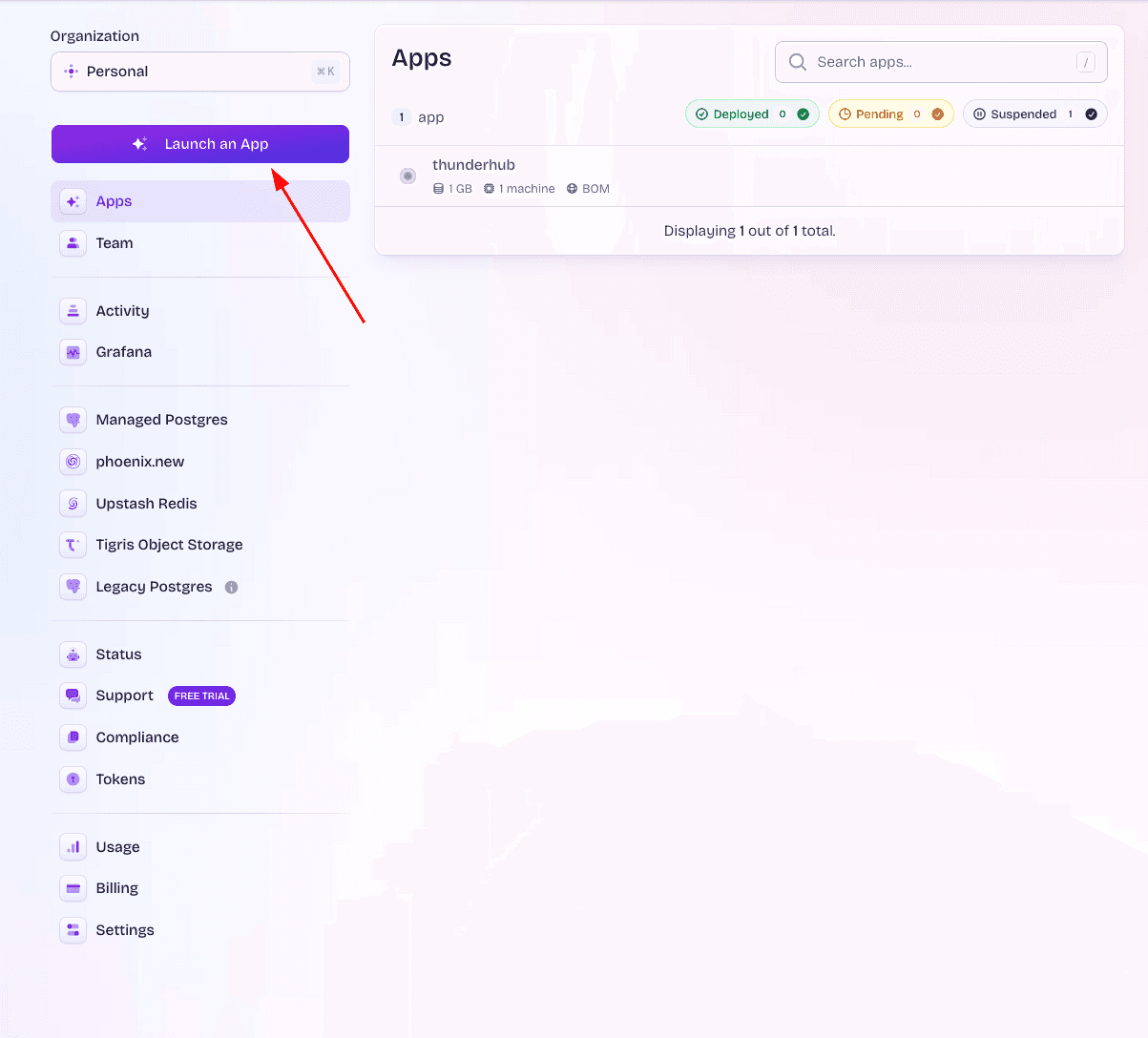
If this is your first time, Fly will ask you to authorize access to GitHub.
3. Pick the ThunderHub repository
Select either:
- The official
apotdevin/thunderhubrepository, or - Your own fork if you’ve made customizations
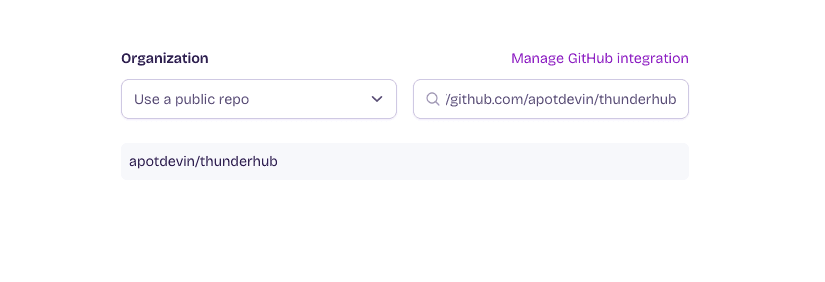
Unlike the CLI method, you don’t need to write a fly.toml. Fly scans the
Dockerfile in the repo and auto-generates one for you.
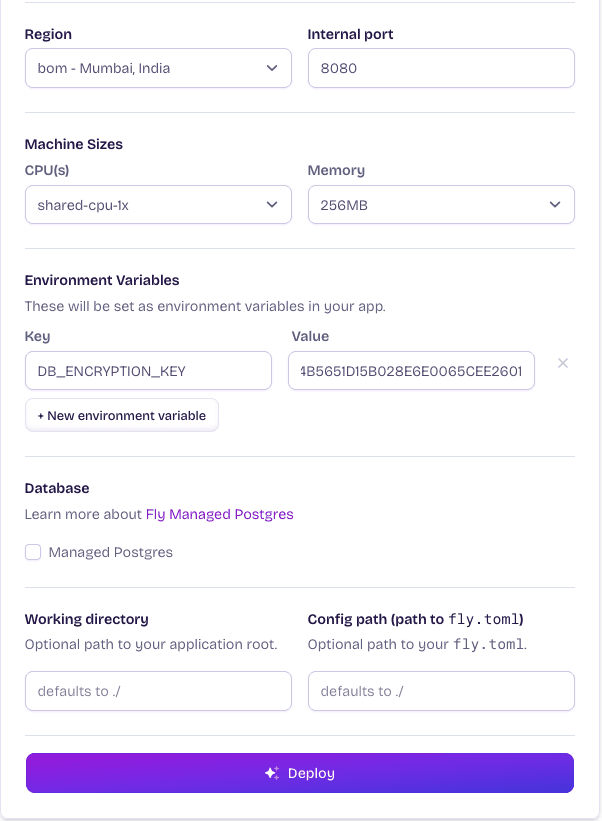
4. Configure the app
Fly’s wizard will ask for:
- App name: anything unique (e.g.
my-thunderhub) - Region: the region closest to you
- Skip Postgres, Upstash Redis, Tigris, and Sentry when prompted
5. Set the database encryption key
Before the first deploy, set the DB_ENCRYPTION_KEY secret. In the dashboard’s Environment Variables section, add a new secret:
- Name:
DB_ENCRYPTION_KEY - Value: a 64-character hex string
Generate one locally and paste the output:
macOS / Linux
openssl rand -hex 32Save this value somewhere safe. If you ever lose it, every node credential stored in the ThunderHub database becomes unrecoverable and you’ll have to re-add your nodes.
6. Deploy
Click Deploy in the dashboard. The first build takes 5 to 10 minutes.
When the deploy succeeds, you’ll see your app’s URL in the dashboard.
The auto-generated fly.toml doesn’t include the persistent volume mount or
the always-on machine settings recommended for ThunderHub. After the first
deploy, you’ll likely want to add these by editing fly.toml in your repo and
pushing a new commit, or by switching to the CLI
method.
Complete first-run setup
Open the URL in your browser. ThunderHub detects an empty database and shows a first-run setup screen. Create your admin account here.
Once logged in, you’ll see the “Connect a Node” screen. To add your node, put in the connection details (host, macaroon, TLS cert) and click “Connect Node”.
ThunderHub encrypts these with the DB_ENCRYPTION_KEY you set above and stores them on the persistent volume, so they survive restarts and redeploys.
See the Configuration page for full details on connecting to LND or litd nodes, including macaroon paths for common setups.
Custom domain (optional)
To use your own domain:
fly certs add thub.yourdomain.comFly returns the DNS records you need to add (an A/AAAA or CNAME record). Once DNS propagates, Fly auto-provisions a Let’s Encrypt certificate.
Updating ThunderHub
To deploy a newer version, pull the latest code and redeploy:
git pull origin master
fly deploy
Your data on the volume is preserved across deploys, so you don’t need to re-add nodes.
If you deployed from the dashboard, push to your fork’s branch and Fly will build and redeploy automatically.
Troubleshooting
Build runs out of memory
Fly’s default remote builder is small. If your build fails with an OOM error, retry with a local build:
fly deploy --local-onlyThis builds the Docker image on your own machine and pushes it to Fly.
Healthcheck failing
Check the logs:
fly logsThe most common cause is a missing DB_ENCRYPTION_KEY. Verify with fly secrets list. If it’s missing, set it again and redeploy.
App is slow or running out of memory
If you see OOM kills in fly logs or the app feels sluggish, scale up the VM. See Fly’s scaling docs for the available options.
Need to wipe and start over
fly apps destroy <app-name>This deletes the app, the volume, and all data permanently.
What’s next
- Connect a Voltage node. See the Voltage guide
- Configure additional environment variables. See the Configuration page
- Run litd alongside LND. See the Lightning Terminal docs